| ← Retour à Claude Code Best Practice | |
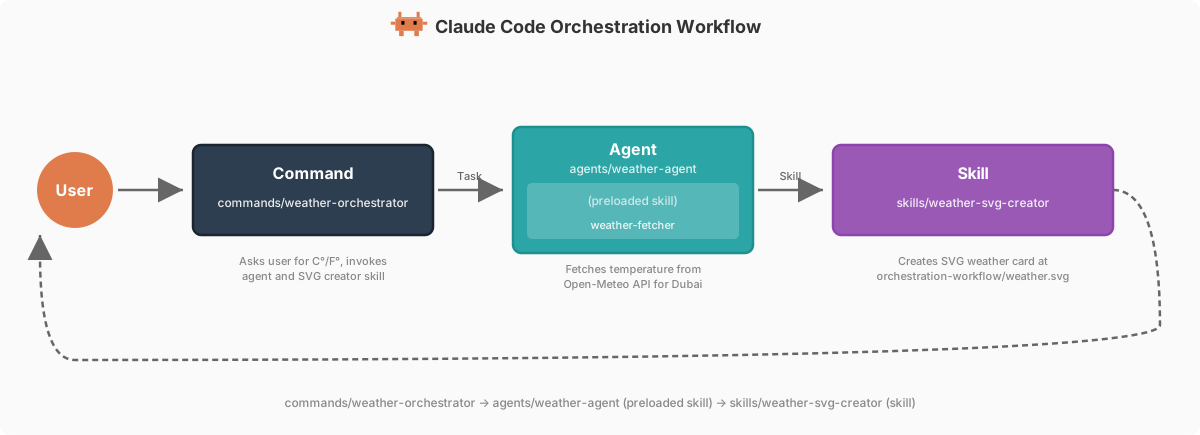
 Le weather agent est implémenté dans ce repo comme exemple du pattern d'architecture **Command → Agent → Skill**, démontrant deux patterns de skill distincts.
---
## Weather Agent
**Fichier** : [`.claude/agents/weather-agent.md`](../../.claude/agents/weather-agent.md)
```yaml
---
name: weather-agent
description: Use this agent PROACTIVELY when you need to fetch weather data for
Dubai, UAE. This agent fetches real-time temperature from Open-Meteo
using its preloaded weather-fetcher skill.
allowedTools:
- "Read"
- "Skill"
model: sonnet
color: green
maxTurns: 5
permissionMode: acceptEdits
memory: project
skills:
- weather-fetcher
---
# Weather Agent
You are a specialized weather agent that fetches weather data for Dubai,
UAE.
## Your Task
Execute the weather workflow by following the instructions from your preloaded
skill:
1. **Fetch**: Follow the `weather-fetcher` skill instructions to fetch the
current temperature
2. **Report**: Return the temperature value and unit to the caller
3. **Memory**: Update your agent memory with the reading details for
historical tracking
...
```
L'agent a un skill préchargé (`weather-fetcher`) qui fournit les instructions pour récupérer depuis Open-Meteo. Il renvoie la valeur de température et l'unité à la commande appelante.
---
## 
```bash
$ claude
> what is the weather in dubai?
```
---
## 
Tu peux créer un agent avec la commande `/agents`,
```bash
$ claude
> /agents
```
ou demander à Claude d'en créer un pour toi — il génère le fichier markdown avec frontmatter YAML et corps dans `.claude/agents/
Le weather agent est implémenté dans ce repo comme exemple du pattern d'architecture **Command → Agent → Skill**, démontrant deux patterns de skill distincts.
---
## Weather Agent
**Fichier** : [`.claude/agents/weather-agent.md`](../../.claude/agents/weather-agent.md)
```yaml
---
name: weather-agent
description: Use this agent PROACTIVELY when you need to fetch weather data for
Dubai, UAE. This agent fetches real-time temperature from Open-Meteo
using its preloaded weather-fetcher skill.
allowedTools:
- "Read"
- "Skill"
model: sonnet
color: green
maxTurns: 5
permissionMode: acceptEdits
memory: project
skills:
- weather-fetcher
---
# Weather Agent
You are a specialized weather agent that fetches weather data for Dubai,
UAE.
## Your Task
Execute the weather workflow by following the instructions from your preloaded
skill:
1. **Fetch**: Follow the `weather-fetcher` skill instructions to fetch the
current temperature
2. **Report**: Return the temperature value and unit to the caller
3. **Memory**: Update your agent memory with the reading details for
historical tracking
...
```
L'agent a un skill préchargé (`weather-fetcher`) qui fournit les instructions pour récupérer depuis Open-Meteo. Il renvoie la valeur de température et l'unité à la commande appelante.
---
## 
```bash
$ claude
> what is the weather in dubai?
```
---
## 
Tu peux créer un agent avec la commande `/agents`,
```bash
$ claude
> /agents
```
ou demander à Claude d'en créer un pour toi — il génère le fichier markdown avec frontmatter YAML et corps dans `.claude/agents/ Le weather agent est l'**Agent** dans le pattern d'orchestration Command → Agent → Skill. Il reçoit le workflow de la commande `/weather-orchestrator` et récupère la température via son skill préchargé (`weather-fetcher`). La commande invoque ensuite le skill autonome `weather-svg-creator` pour créer la sortie visuelle.