
Claude Code Learning Journey
From your first conversation to wiring your first workflow
An onboarding guide for non-engineers & engineers alike.
From your first conversation to wiring your first workflow
An onboarding guide for non-engineers & engineers alike.
Built from the inside out: what Claude sees, what it always knows, who it becomes, what it's trained to do, how you trigger it, and how it all wires together.
Before anything else — before agents, before skills — there's Claude's brain. Everything Claude can see, remember, and reason about right now lives in that brain. If it's not in there, Claude doesn't know about it.
Imagine Claude has a brain that holds everything it's aware of right now — your question, every file it's opened, every tool result, every word it's said back to you. Inside that brain is a small working area (picture a desk) where the actual thinking happens. If a thought isn't in the brain, Claude can't use it. Simple as that.
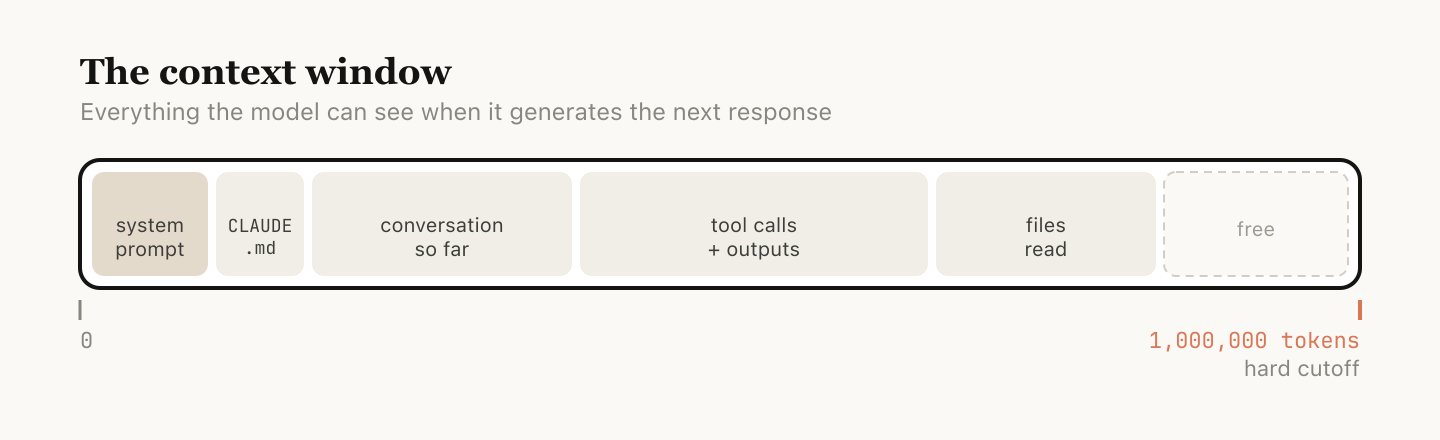
Everything you give Claude in a conversation lands in its brain:
1. The brain is finite. It can hold about 1 million tokens — roughly 750,000 words, or a short novel. Big, but not infinite. 2. The brain empties at the end of every chat. When you start a new conversation, Claude remembers nothing from the last one unless you tell it again.
The moment you open Claude Code, certain things land in Claude's brain before you've typed a word. The rest waits in the wings — only loaded when you actually need it. This is called progressive disclosure.
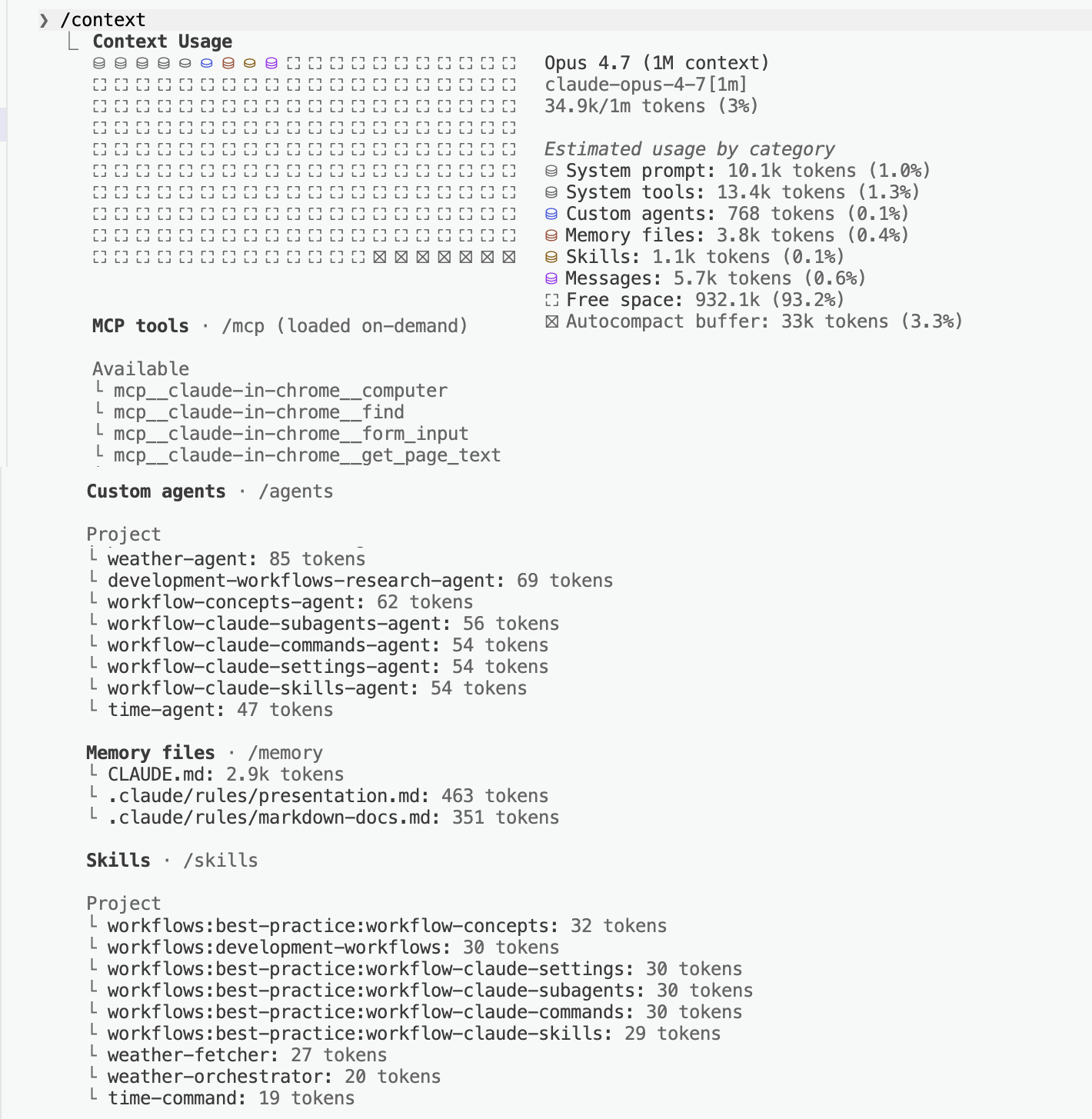
Only the descriptions of skills and agents are loaded at startup — the rest is fetched on-demand. That's progressive disclosure. MCPs work the same way when set up for deferred loading.
The brain has a fixed budget (~1M tokens). Loading every skill, agent, and external tool upfront would burn the budget before you've typed a word. Progressive disclosure keeps the brain light. Run /context any time to see exactly what's currently loaded.
The more stuff crammed into Claude's brain, the harder it is to focus on what matters. This is called context rot — performance drops as the brain gets crowded.
"Every turn is a branching point." After Claude finishes a response, you don't have to just keep typing. You have five options — and four of them exist to keep the brain clear.
| Option | When to use it |
|---|---|
| Continue | Same task, everything in the brain still matters |
| Rewind (tap Esc twice) | Claude went down a wrong path — jump back and try again with what you learned |
| /compact | The brain is bloated — ask Claude to summarize and keep going on top of the summary |
| /clear (fresh chat) | Starting a truly new task — wipe the brain clean, start with a fresh brief |
| Subagent | The next step will make a mess — send a helper to do it in their own brain and only bring back the answer |
When you start a new task, start a new chat. Don't let yesterday's thinking clutter today's brain.
You can't create the context — it's just there, the moment you open a chat. But you can see how full it is, trim it down, or wipe it clean. Three commands give you full control.
/context shows you how full the brain is. /compact summarizes it. /clear wipes it.
/context
Shows a breakdown of how many tokens are used and what's taking up space (system prompt, tools, files, conversation).
/compact or /clear
/compact keeps a short summary so you can continue. /clear wipes everything for a truly fresh start.
/context is checking how cluttered the desk is. /compact is filing the paperwork into a one-page summary. /clear is walking the assistant out of the room and back in for a fresh one. Same person, same skills — just a tidier workspace.
Check first with /context. Trim with /compact. Reset with /clear when starting a new task.
If context is Claude's brain, CLAUDE.md is the standing instructions pinned in that brain at the start of every chat — rules Claude has memorized before you've said a word.
Imagine hiring a brilliant new assistant every single morning — someone who forgets everything at 5pm. You'd get tired of re-explaining "we say clients, not customers" and "always CC my manager" over and over. So you pin those rules into their brain before the day starts. That's CLAUDE.md: a short list of standing instructions Claude reads first, every time.
It's just a plain-text file at the top of your project. Here's a CLAUDE.md a non-engineer might write:
Claude can draft your first CLAUDE.md for you. The next slide shows how.
You don't need to write CLAUDE.md by hand. Claude can look at your project and draft one for you.
Type /init inside Claude Code, in your project folder. Claude does the rest.
/init in Claude Code
Make sure you're in your project folder. No other setup needed.
Running /init is like asking the new hire to read everything on the shared drive before you meet them — they walk in already knowing the project's shape, and they write up what they learned as a handbook for future Claude.
You'll keep improving it over time (Boris's tip on the next slide). But /init gets you to a working draft in under a minute.
"After every correction, end with: Update your CLAUDE.md so you don't make that mistake again. Claude is eerily good at writing rules for itself."
The CLAUDE.md isn't something you write once and forget. It's a living memory of every lesson you've ever had to teach Claude. The workflow:
Keep it short. Under 200 lines. Long CLAUDE.md files get ignored — same as a 50-page employee handbook nobody reads.
Aim for under 200 lines. Files over 200 lines consume more context and may reduce adherence. Put detailed instructions in .claude/rules/ instead.
Claude Code uses two mechanisms to find CLAUDE.md files:
At startup, Claude walks upward from your current directory and loads every CLAUDE.md it finds.
Always loaded immediately.
CLAUDE.md files in subdirectories below you are loaded lazily — only when Claude reads files in those folders.
Loaded on demand.
For topic-specific instructions, use .claude/rules/*.md. Each rule file can target specific file patterns using # Glob: pattern at the top — they only load when Claude works with matching files.
An agent is Claude playing a specific role, with a specific job title — a weather reporter, a copy editor, a research analyst. Same Claude, different hat.
Without an agent, you walk into a random kitchen and shout "make me pasta!" — whoever happens to hear you might boil instant noodles or make a five-course Italian meal. With an agent, you're walking up to a specific person with a specific job title. The Italian chef makes pasta the Italian-chef way. Every time.
You ask Claude "What's the weather in Dubai?"
It might guess from its training data, search the web, or make something up.
You don't know what it'll do.
A weather-agent has a clear job description:
"Always check the official Open-Meteo weather service. Always return the temperature in a clean, consistent format."
Same question, same approach, every time.
The difference in one picture: prompting is asking a stranger on the street; using an agent is asking your dedicated specialist.
| Prompting (stranger) | Agent (specialist) | |
|---|---|---|
| Who answers | Whoever happens to be there | The person you hired for this exact job |
| Source of truth | Could be anywhere | Always the official weather service |
| Format | Whatever comes out | Clean, consistent temperature + unit |
| Twice in a row? | Different each time | Same method, same shape |
Agents don't make Claude smarter — they make it predictable. Same question → same approach → same quality. That's what you need for anything you'll do more than once.
"When Claude spawns an agent, that agent gets its own fresh brain. It can do as much work as it needs, then synthesize its results — only the final report comes back to you."
This is quietly one of the most useful things about agents, and it connects directly to what we learned about context:
Just ask. "Spin up an agent to read through these ten PDFs and summarize them." Claude will dispatch a specialist, they'll churn through the work in their own brain, and come back with just the summary.
You don't write an agent from scratch — Claude helps you build one. Type /agents inside Claude Code and a guided menu opens.
Type /agents in Claude Code. A menu appears with your existing agents and an option to create a new one.
/agents
A menu opens listing your existing agents plus "Create new agent".
Creating an agent is like writing a job description for a new hire. You say what the role is, what tools they get, and how they should behave. Claude drafts the JD; you review and adjust.
Agents are just text files. Anyone on your team can create, share, or edit one. No coding required.
The config block at the top of an agent file controls its identity and capabilities:
"PROACTIVELY" for auto-invocation
haiku, sonnet, opus, or inherit (default)
user, project, or local
red, blue, green, etc.
If an agent is a person with a job title, a skill is a specific thing they've been trained to do — a certification, a how-to, a recipe.
When someone joins your team, they have a role (agent), but they also go through specific training modules — how to use the CRM, how to write a proposal, how to run a standup. Each training module is a skill.
Shayan has many skills:
Each skill has its own knowledge and methods. Shayan uses the right skill for the right task. Claude works the same way.
"If you do something more than once a day, turn it into a skill."
The rule is simple: anything you're explaining to Claude over and over is a skill waiting to be written down. A few examples from real teams:
Skills are how repetition becomes reliability. Write it down once, and Claude does it the same way forever — or until you update the skill.
The weather-agent is the person with the job title "Weather Reporter".
It defines the role and behavior.
The weather-fetcher skill is the specific training on how to fetch weather data.
It contains exact instructions:
One agent can have multiple skills, and one skill can be used by multiple agents. Skills are reusable building blocks. Agents are the people who use them.
Skills don't have a slash-command creator — they're plain markdown files you create directly. The pattern is simple enough that you can write your first one in a minute.
Create .claude/skills/<your-skill-name>/SKILL.md in your project. That's it.
.claude/skills/weekly-update/SKILL.md. Or ask Claude: "Turn this into a skill called weekly-update."
Writing a skill is like writing a page in a recipe book. Title at the top, ingredients, steps. Anyone on the team can open it and follow along — Claude included.
The skill contains instructions, not code. It tells Claude how to do something using its existing tools. The next slide shows the small config block at the top.
The small config block at the top of a SKILL.md (the "frontmatter") controls how the skill behaves:
/slash-command. Defaults to directory name
false to hide from / menu — becomes background knowledge only
haiku, sonnet, or opus
fork to run in isolated subagent context
User-invocable: appears in / menu, user runs it directly. Agent-preloaded: set user-invocable: false, then list it in an agent's skills: field — it becomes domain knowledge injected into that agent.
If CLAUDE.md is what Claude always knows, a command is what Claude does when you press one specific button. Slash commands turn a multi-step workflow into a single keystroke.
If agents are employees and skills are their training, a command is the manager's playbook — "when someone asks for a weather report, first ask them Celsius or Fahrenheit, then dispatch the weather team, then create the visual."
You've already seen five built-in commands in this presentation:
/init
Drafts a CLAUDE.md for your project (Topic 2)
/agents
Opens the agent creator menu (Topic 3)
/context
Shows how full Claude's brain is right now (Topic 1)
/clear & /compact
Reset or summarize the brain (Topic 1)
You can write your own commands the same way. The next slide shows how.
Commands are markdown files too. If you can write a recipe, you can write a command.
Create .claude/commands/<your-command-name>.md. As soon as it's saved, /<your-command-name> appears in Claude Code's slash menu.
.claude/commands/status-report.md. The filename becomes the command name.
A command is like a button on a coffee machine. One press, the machine grinds, brews, foams, pours. You don't think about the steps — you just want espresso. Slash commands are buttons you've labelled yourself.
Commands are how you turn a multi-step prompt into a single keystroke that anyone on your team can run.
Five pieces, one orchestrated flow: a command kicks it off, an agent does the work using its preloaded skill, then another skill takes the result and turns it into output.
This is the core architecture pattern of Claude Code workflows — demonstrated in this very repo by the weather example:
The weather workflow demonstrates both skill patterns in a single flow:
weather-fetcher is listed in the agent's skills: field.
Its full content is injected into the agent's context at startup. The agent reads it like a reference manual.
weather-svg-creator is called directly by the command via the Skill tool.
It runs independently in the command's context, not inside any agent.
A workflow isn't a separate file type. It emerges when one command calls one or more agents and skills in sequence. Here's how the weather workflow in this repo wires itself together — your own can follow the same shape.
One command at the top. One agent with a skill preloaded for fetching. One skill at the end for output. Wire them in the command file.
.claude/commands/weather-orchestrator.md — the playbook the user types.
.claude/agents/weather-agent.md with skills: [weather-fetcher] in its config — the specialist + their training.
.claude/skills/weather-svg-creator/SKILL.md — invoked directly by the command after the agent returns.
The workflow is the relay race. The command is the starter pistol. The agent is runner one (fetches the data, hands the baton back). The skill is runner two (turns the data into a visual). You don't run the race — you just point and say "go."
Every workflow you'll ever build follows this same shape: Command at the top, Agent + Skill in the middle, Skill at the end. Once you've wired one, the rest are variations on the theme.
Six topics, one continuous arc
From understanding Claude's brain to wiring a complete Command → Agent → Skill workflow. The same six pieces compose every workflow you'll ever build.
The learning continues — hooks, MCP servers, settings, and more.
github.com/shanraisshan/claude-code-best-practice